> ## Documentation Index
> Fetch the complete documentation index at: https://docs-dev-feat-docs-5607-tenant-acl.mintlify.site/llms.txt
> Use this file to discover all available pages before exploring further.

> Learn how to configure an update policy form using Forms for Actions for users to review and accept new terms of service or consent updates.

# Use Cases: Configure an update policy form using Forms

<Card title="Before you start">
  1. Create a [Machine-to-Machine Application](/docs/get-started/auth0-overview/create-applications/machine-to-machine-apps) with the following scopes enabled:

  * `read:users`
  * `update:users`
  * `create:users`
  * `read:users_app_metadata`
  * `update:users_app_metadata`
  * `create:users_app_metadata`

  2. Add a [Vault connection](/docs/customize/forms/vault) using the M2M application credentials.
</Card>

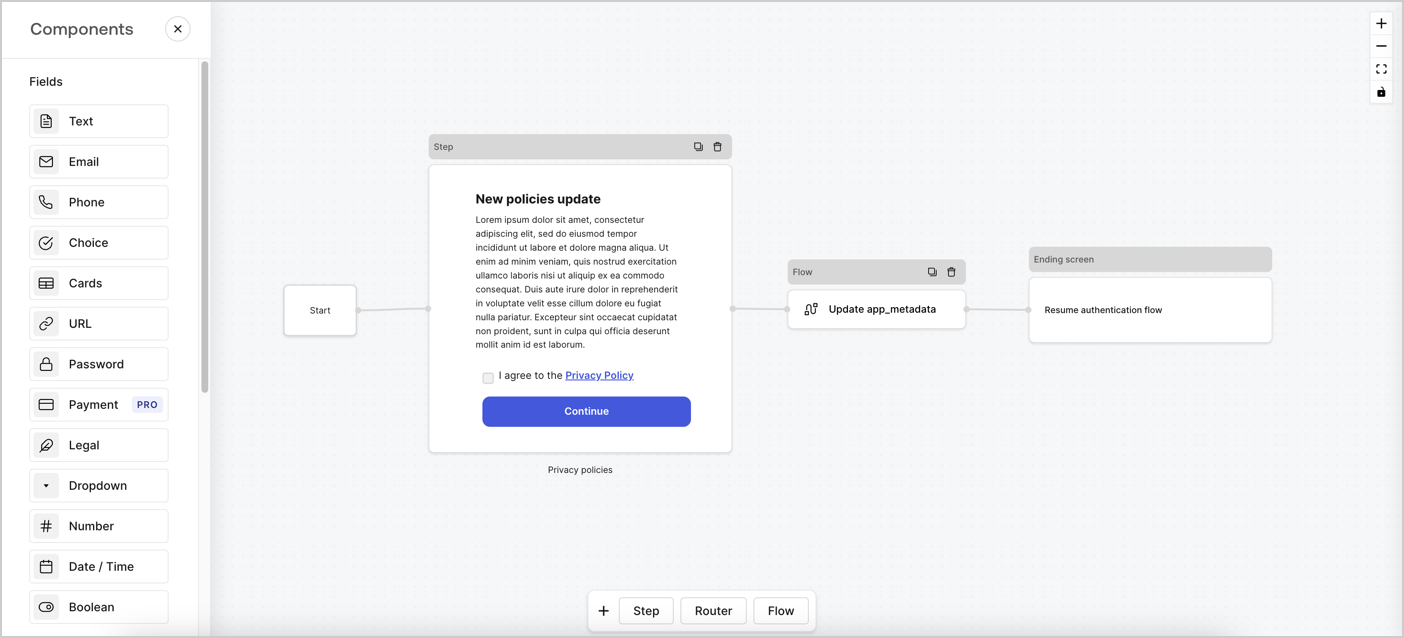
Forms for Actions allows you to create custom privacy policies flows and store the consent under the `app_metadata` object.
<Frame>
  <img src="https://mintcdn.com/docs-dev-feat-docs-5607-tenant-acl/D-rj9VDkZmJlpKyj/docs/images/cdy7uua7fh8z/6i68dMvHDTijfRmSgN1x8Q/ad900e7d4c0fb34645921435472b8684/privavy-policy-form.png?fit=max&auto=format&n=D-rj9VDkZmJlpKyj&q=85&s=cec07511bca2691595a46b2f2af3d81d" alt="Dashboard > Actions > Forms > Privacy policy use case" data-og-width="1404" width="1404" data-og-height="638" height="638" data-path="docs/images/cdy7uua7fh8z/6i68dMvHDTijfRmSgN1x8Q/ad900e7d4c0fb34645921435472b8684/privavy-policy-form.png" data-optimize="true" data-opv="3" srcset="https://mintcdn.com/docs-dev-feat-docs-5607-tenant-acl/D-rj9VDkZmJlpKyj/docs/images/cdy7uua7fh8z/6i68dMvHDTijfRmSgN1x8Q/ad900e7d4c0fb34645921435472b8684/privavy-policy-form.png?w=280&fit=max&auto=format&n=D-rj9VDkZmJlpKyj&q=85&s=1f734969327c236c08b8c902bbb84483 280w, https://mintcdn.com/docs-dev-feat-docs-5607-tenant-acl/D-rj9VDkZmJlpKyj/docs/images/cdy7uua7fh8z/6i68dMvHDTijfRmSgN1x8Q/ad900e7d4c0fb34645921435472b8684/privavy-policy-form.png?w=560&fit=max&auto=format&n=D-rj9VDkZmJlpKyj&q=85&s=0cf4ab211c9e8f1f8cb2d0075b1d1c1b 560w, https://mintcdn.com/docs-dev-feat-docs-5607-tenant-acl/D-rj9VDkZmJlpKyj/docs/images/cdy7uua7fh8z/6i68dMvHDTijfRmSgN1x8Q/ad900e7d4c0fb34645921435472b8684/privavy-policy-form.png?w=840&fit=max&auto=format&n=D-rj9VDkZmJlpKyj&q=85&s=b8abbc5aebca5608b646339494d84461 840w, https://mintcdn.com/docs-dev-feat-docs-5607-tenant-acl/D-rj9VDkZmJlpKyj/docs/images/cdy7uua7fh8z/6i68dMvHDTijfRmSgN1x8Q/ad900e7d4c0fb34645921435472b8684/privavy-policy-form.png?w=1100&fit=max&auto=format&n=D-rj9VDkZmJlpKyj&q=85&s=6f182343dc7b8abd8f80de1a1f491643 1100w, https://mintcdn.com/docs-dev-feat-docs-5607-tenant-acl/D-rj9VDkZmJlpKyj/docs/images/cdy7uua7fh8z/6i68dMvHDTijfRmSgN1x8Q/ad900e7d4c0fb34645921435472b8684/privavy-policy-form.png?w=1650&fit=max&auto=format&n=D-rj9VDkZmJlpKyj&q=85&s=246aeb741d2be2330b0be857fb9ec537 1650w, https://mintcdn.com/docs-dev-feat-docs-5607-tenant-acl/D-rj9VDkZmJlpKyj/docs/images/cdy7uua7fh8z/6i68dMvHDTijfRmSgN1x8Q/ad900e7d4c0fb34645921435472b8684/privavy-policy-form.png?w=2500&fit=max&auto=format&n=D-rj9VDkZmJlpKyj&q=85&s=746041221d29407051b42e9dabbf5de3 2500w" />
</Frame>

The sections below outline how you can create an Update Policy form using nodes and flows, along with steps for adding your form to a [Post Login](/docs/customize/actions/explore-triggers/signup-and-login-triggers/login-trigger) Action.

## Create a form from scratch

Follow these steps to create a form to gather information:

1. Open the Form editor by selecting **Auth0 Dashboard > Actions > Forms.**
2. Select **Create Form** > **Start from scratch**.

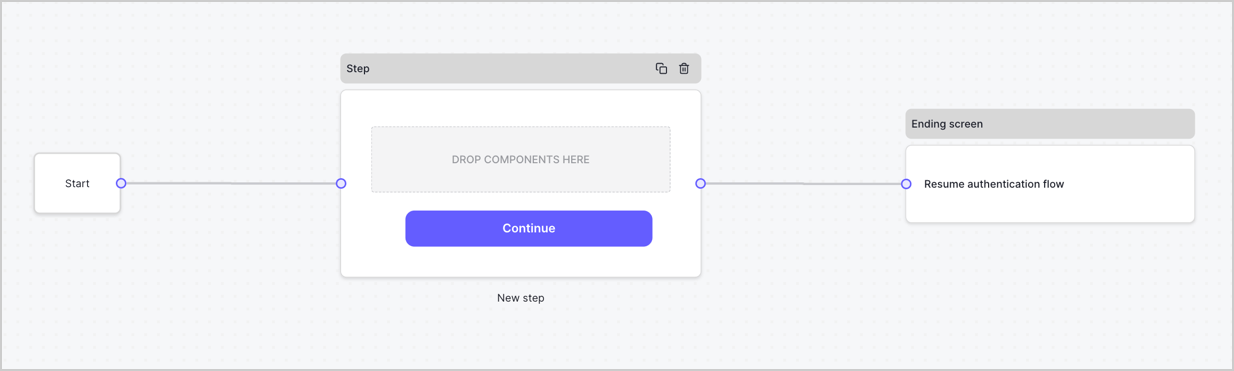
By default, a new form contains a Start node, a Step node, and an Ending screen node.
<Frame>
  <img src="https://mintcdn.com/docs-dev-feat-docs-5607-tenant-acl/snMyHHpAFXtAFGTA/docs/images/cdy7uua7fh8z/2TZ9jSjgEcARFpULI6hz4R/a4319a1bd482f2ee5cc23100fdb2f42c/New-form-Forms-for-action-use-case.png?fit=max&auto=format&n=snMyHHpAFXtAFGTA&q=85&s=5c9c2ee0e675dda5b11a8e79a78347d3" alt="Dashboard > Forms > Use Cases > Form" data-og-width="1234" width="1234" data-og-height="371" height="371" data-path="docs/images/cdy7uua7fh8z/2TZ9jSjgEcARFpULI6hz4R/a4319a1bd482f2ee5cc23100fdb2f42c/New-form-Forms-for-action-use-case.png" data-optimize="true" data-opv="3" srcset="https://mintcdn.com/docs-dev-feat-docs-5607-tenant-acl/snMyHHpAFXtAFGTA/docs/images/cdy7uua7fh8z/2TZ9jSjgEcARFpULI6hz4R/a4319a1bd482f2ee5cc23100fdb2f42c/New-form-Forms-for-action-use-case.png?w=280&fit=max&auto=format&n=snMyHHpAFXtAFGTA&q=85&s=134ded1293a79411bbee65e4712ac494 280w, https://mintcdn.com/docs-dev-feat-docs-5607-tenant-acl/snMyHHpAFXtAFGTA/docs/images/cdy7uua7fh8z/2TZ9jSjgEcARFpULI6hz4R/a4319a1bd482f2ee5cc23100fdb2f42c/New-form-Forms-for-action-use-case.png?w=560&fit=max&auto=format&n=snMyHHpAFXtAFGTA&q=85&s=fc39219748cdb104e217fc2d8a883a0a 560w, https://mintcdn.com/docs-dev-feat-docs-5607-tenant-acl/snMyHHpAFXtAFGTA/docs/images/cdy7uua7fh8z/2TZ9jSjgEcARFpULI6hz4R/a4319a1bd482f2ee5cc23100fdb2f42c/New-form-Forms-for-action-use-case.png?w=840&fit=max&auto=format&n=snMyHHpAFXtAFGTA&q=85&s=6bc9aaf21d8251795ca5a651fbfd8207 840w, https://mintcdn.com/docs-dev-feat-docs-5607-tenant-acl/snMyHHpAFXtAFGTA/docs/images/cdy7uua7fh8z/2TZ9jSjgEcARFpULI6hz4R/a4319a1bd482f2ee5cc23100fdb2f42c/New-form-Forms-for-action-use-case.png?w=1100&fit=max&auto=format&n=snMyHHpAFXtAFGTA&q=85&s=e796f5b5b9ba9c24aae225db71c4b8a0 1100w, https://mintcdn.com/docs-dev-feat-docs-5607-tenant-acl/snMyHHpAFXtAFGTA/docs/images/cdy7uua7fh8z/2TZ9jSjgEcARFpULI6hz4R/a4319a1bd482f2ee5cc23100fdb2f42c/New-form-Forms-for-action-use-case.png?w=1650&fit=max&auto=format&n=snMyHHpAFXtAFGTA&q=85&s=11edae9203ec58abe95cf0c499d80bc4 1650w, https://mintcdn.com/docs-dev-feat-docs-5607-tenant-acl/snMyHHpAFXtAFGTA/docs/images/cdy7uua7fh8z/2TZ9jSjgEcARFpULI6hz4R/a4319a1bd482f2ee5cc23100fdb2f42c/New-form-Forms-for-action-use-case.png?w=2500&fit=max&auto=format&n=snMyHHpAFXtAFGTA&q=85&s=d4e19ae80031155f55d0678eba83ec03 2500w" />
</Frame>

### Configure the Step node

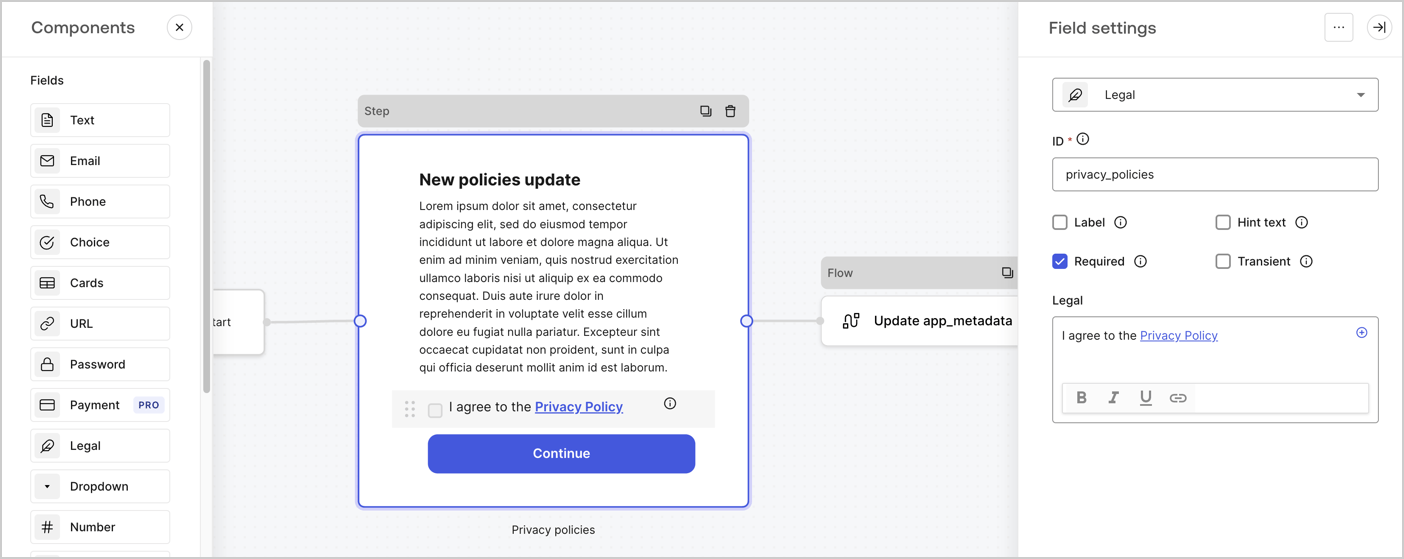
The Step node is the graphical interface visible to users. Add [Fields](/docs/customize/forms/nodes-and-components) to the Step node to collect the new agreement acceptance value by following these steps:

1. Drag a **Rich text** field from the **Components menu** into the **Step** node.

   * **Rich text**: Enter a description of your privacy policies updates.
   * Select **Save**.
2. Drag a **Legal** field into the **Step** node.

   * **ID**: Enter `privacy_policies`.
   * **Required**: Enable the checkbox.
   * **Legal**: Enter `I agree to the Privacy Policy`.
   * Select **Save**.
3. Select **Publish** to save.
<Frame>
  <img src="https://mintcdn.com/docs-dev-feat-docs-5607-tenant-acl/32jsGhPpFIpqXKkA/docs/images/cdy7uua7fh8z/59zFFjQjAnjogkc2QGIqqJ/0ad66b1b636544122aa4e65968b76c2c/privacy-policy-step-node.png?fit=max&auto=format&n=32jsGhPpFIpqXKkA&q=85&s=d024d8bc3a5bfe1cb00ec3ed44738dfd" alt="Dashboard > Actions > Forms > Use case privacy policy step node" data-og-width="1404" width="1404" data-og-height="559" height="559" data-path="docs/images/cdy7uua7fh8z/59zFFjQjAnjogkc2QGIqqJ/0ad66b1b636544122aa4e65968b76c2c/privacy-policy-step-node.png" data-optimize="true" data-opv="3" srcset="https://mintcdn.com/docs-dev-feat-docs-5607-tenant-acl/32jsGhPpFIpqXKkA/docs/images/cdy7uua7fh8z/59zFFjQjAnjogkc2QGIqqJ/0ad66b1b636544122aa4e65968b76c2c/privacy-policy-step-node.png?w=280&fit=max&auto=format&n=32jsGhPpFIpqXKkA&q=85&s=9343efef776a27ef568c2365653c36cf 280w, https://mintcdn.com/docs-dev-feat-docs-5607-tenant-acl/32jsGhPpFIpqXKkA/docs/images/cdy7uua7fh8z/59zFFjQjAnjogkc2QGIqqJ/0ad66b1b636544122aa4e65968b76c2c/privacy-policy-step-node.png?w=560&fit=max&auto=format&n=32jsGhPpFIpqXKkA&q=85&s=319f92cc329512b67652d4220447cd5b 560w, https://mintcdn.com/docs-dev-feat-docs-5607-tenant-acl/32jsGhPpFIpqXKkA/docs/images/cdy7uua7fh8z/59zFFjQjAnjogkc2QGIqqJ/0ad66b1b636544122aa4e65968b76c2c/privacy-policy-step-node.png?w=840&fit=max&auto=format&n=32jsGhPpFIpqXKkA&q=85&s=ef6fade5f6155717d7725755d4132552 840w, https://mintcdn.com/docs-dev-feat-docs-5607-tenant-acl/32jsGhPpFIpqXKkA/docs/images/cdy7uua7fh8z/59zFFjQjAnjogkc2QGIqqJ/0ad66b1b636544122aa4e65968b76c2c/privacy-policy-step-node.png?w=1100&fit=max&auto=format&n=32jsGhPpFIpqXKkA&q=85&s=e938e49c9e822de6e7fe01d1c7ca3395 1100w, https://mintcdn.com/docs-dev-feat-docs-5607-tenant-acl/32jsGhPpFIpqXKkA/docs/images/cdy7uua7fh8z/59zFFjQjAnjogkc2QGIqqJ/0ad66b1b636544122aa4e65968b76c2c/privacy-policy-step-node.png?w=1650&fit=max&auto=format&n=32jsGhPpFIpqXKkA&q=85&s=ef909e35951030427f400852ac2cfdf2 1650w, https://mintcdn.com/docs-dev-feat-docs-5607-tenant-acl/32jsGhPpFIpqXKkA/docs/images/cdy7uua7fh8z/59zFFjQjAnjogkc2QGIqqJ/0ad66b1b636544122aa4e65968b76c2c/privacy-policy-step-node.png?w=2500&fit=max&auto=format&n=32jsGhPpFIpqXKkA&q=85&s=7afcee230d55a5b802a2a92ddf531e78 2500w" />
</Frame>

### Configure the Flow node

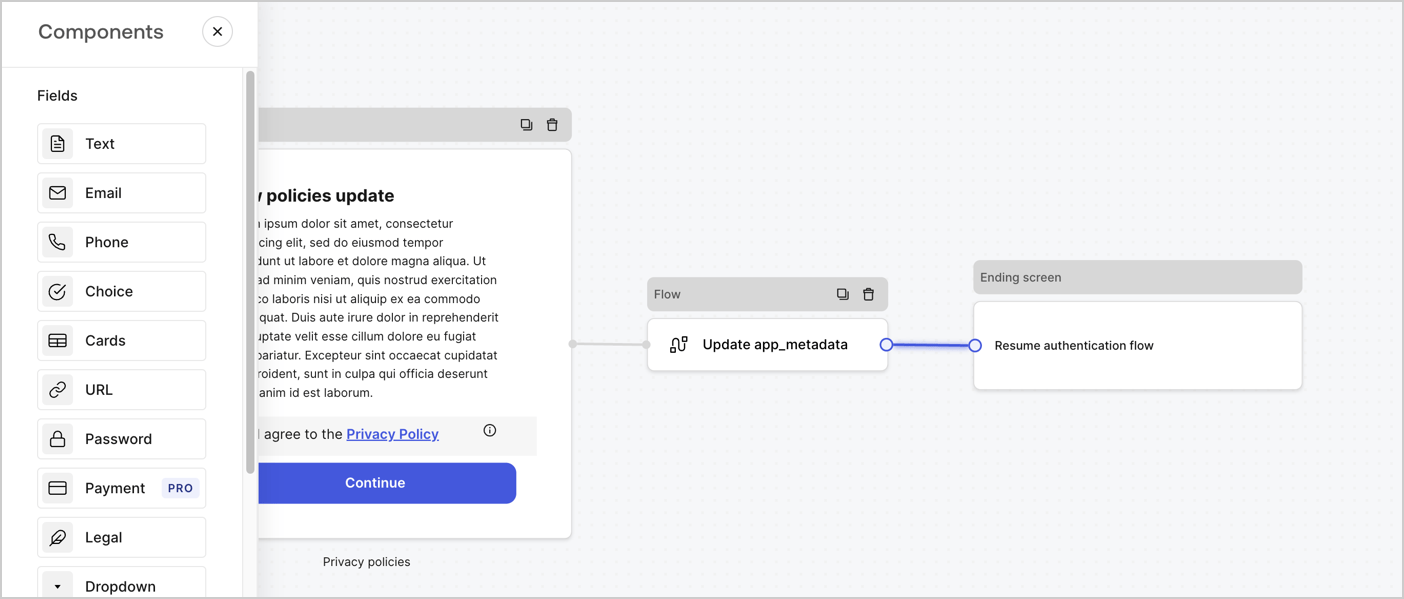
Add a **Flow** node after the **Step** node to update the `app_metadata` and resume the authentication flow by following these steps:

1. Select **Flow** from the bottom of the Form editor.
2. Remove the existing link between the **Step** and **Ending Screen** nodes.
3. Select the new **Flow** > **Click to add a flow** > **Create a new flow.**

   * Enter `Update app_metadata` in the **Name** field.
   * Select **Create**.
   * Select **Save**.
4. Link the **Flow** node to the **Step** and **Ending Screen** nodes as pictured below.
5. Select **Publish** to save.
<Frame>
  <img src="https://mintcdn.com/docs-dev-feat-docs-5607-tenant-acl/D-rj9VDkZmJlpKyj/docs/images/cdy7uua7fh8z/6YIkzm7SrpM9LW76AXuRzh/353c518fe82bbaa440836da1d83596d6/link-policies.png?fit=max&auto=format&n=D-rj9VDkZmJlpKyj&q=85&s=241e7228d3ab5b1ffeca144378c6ee2b" alt="Dashboard > Actions > Forms > Form" data-og-width="1404" width="1404" data-og-height="599" height="599" data-path="docs/images/cdy7uua7fh8z/6YIkzm7SrpM9LW76AXuRzh/353c518fe82bbaa440836da1d83596d6/link-policies.png" data-optimize="true" data-opv="3" srcset="https://mintcdn.com/docs-dev-feat-docs-5607-tenant-acl/D-rj9VDkZmJlpKyj/docs/images/cdy7uua7fh8z/6YIkzm7SrpM9LW76AXuRzh/353c518fe82bbaa440836da1d83596d6/link-policies.png?w=280&fit=max&auto=format&n=D-rj9VDkZmJlpKyj&q=85&s=325c92c0c167d8308a29b51ce4df5f4f 280w, https://mintcdn.com/docs-dev-feat-docs-5607-tenant-acl/D-rj9VDkZmJlpKyj/docs/images/cdy7uua7fh8z/6YIkzm7SrpM9LW76AXuRzh/353c518fe82bbaa440836da1d83596d6/link-policies.png?w=560&fit=max&auto=format&n=D-rj9VDkZmJlpKyj&q=85&s=6b6894761c45606221ce97103c635540 560w, https://mintcdn.com/docs-dev-feat-docs-5607-tenant-acl/D-rj9VDkZmJlpKyj/docs/images/cdy7uua7fh8z/6YIkzm7SrpM9LW76AXuRzh/353c518fe82bbaa440836da1d83596d6/link-policies.png?w=840&fit=max&auto=format&n=D-rj9VDkZmJlpKyj&q=85&s=9c3e513618c107fddd68e7793ece6d66 840w, https://mintcdn.com/docs-dev-feat-docs-5607-tenant-acl/D-rj9VDkZmJlpKyj/docs/images/cdy7uua7fh8z/6YIkzm7SrpM9LW76AXuRzh/353c518fe82bbaa440836da1d83596d6/link-policies.png?w=1100&fit=max&auto=format&n=D-rj9VDkZmJlpKyj&q=85&s=4750ff0b3225a7f92246c4a5451f1782 1100w, https://mintcdn.com/docs-dev-feat-docs-5607-tenant-acl/D-rj9VDkZmJlpKyj/docs/images/cdy7uua7fh8z/6YIkzm7SrpM9LW76AXuRzh/353c518fe82bbaa440836da1d83596d6/link-policies.png?w=1650&fit=max&auto=format&n=D-rj9VDkZmJlpKyj&q=85&s=b1364137a69648f6c3e82b7bfc5f111f 1650w, https://mintcdn.com/docs-dev-feat-docs-5607-tenant-acl/D-rj9VDkZmJlpKyj/docs/images/cdy7uua7fh8z/6YIkzm7SrpM9LW76AXuRzh/353c518fe82bbaa440836da1d83596d6/link-policies.png?w=2500&fit=max&auto=format&n=D-rj9VDkZmJlpKyj&q=85&s=105b3111420656cec44e8cdba57e1587 2500w" />
</Frame>

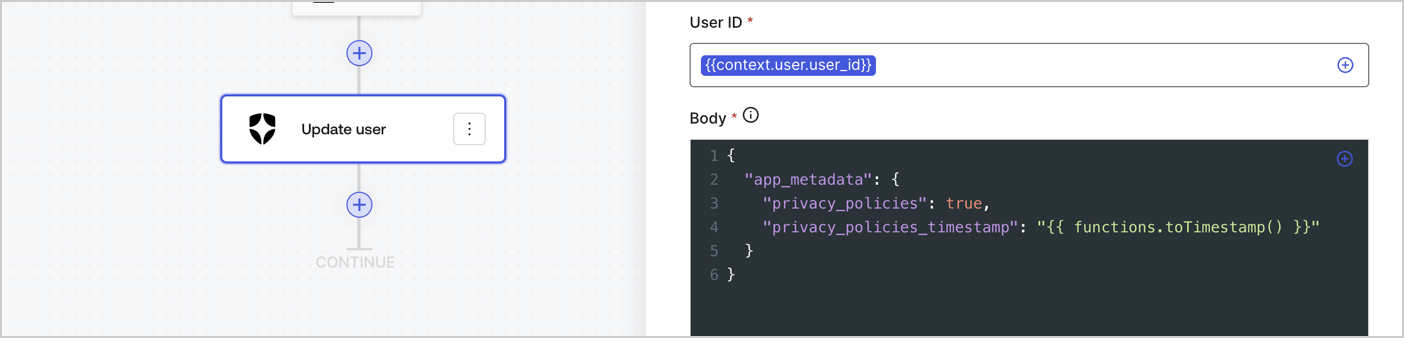
Add an Auth0 Update user action to the flow by following these steps:

1. Select the **Flow** **Update app\_metadata** > **Edit flow** to open the Flow editor in a new tab.
2. Below the StartAction, select the **+** icon to add an **Update user** action. Complete the fields below, then select **Save** to continue.

   * **Connection**: Select from the dropdown the Vault connection to your M2M application.

   * **User ID**: Enter `{{context.user.user_id}}`.

   * **Body**: Copy and paste the following code to update the app\_metadata with the privacy\_policies and privacy\_policies\_timestamp properties.

     ```text lines theme={null}
     {
       "app_metadata": {
         "privacy_policies": true,
         "privacy_policies_timestamp": "{{ functions.toTimestamp() }}"
       }
     }
     ```

   * Select **Save**.
3. Select **Publish** to save.
<Frame>
  <img src="https://mintcdn.com/docs-dev-feat-docs-5607-tenant-acl/Qcb34rhB4ETXXc8l/docs/images/cdy7uua7fh8z/CvMNIwWrOUwaFW4X3G28p/1fb70ae57a20749d9ffaaba8dc0b7e26/update-user-privacy.png?fit=max&auto=format&n=Qcb34rhB4ETXXc8l&q=85&s=c304b6573781b7fb5378cd7714667242" alt="Dashboard > Actions > Forms > User case privacy policy code" data-og-width="1404" width="1404" data-og-height="338" height="338" data-path="docs/images/cdy7uua7fh8z/CvMNIwWrOUwaFW4X3G28p/1fb70ae57a20749d9ffaaba8dc0b7e26/update-user-privacy.png" data-optimize="true" data-opv="3" srcset="https://mintcdn.com/docs-dev-feat-docs-5607-tenant-acl/Qcb34rhB4ETXXc8l/docs/images/cdy7uua7fh8z/CvMNIwWrOUwaFW4X3G28p/1fb70ae57a20749d9ffaaba8dc0b7e26/update-user-privacy.png?w=280&fit=max&auto=format&n=Qcb34rhB4ETXXc8l&q=85&s=732306efa9942d605ea2a008f70d9475 280w, https://mintcdn.com/docs-dev-feat-docs-5607-tenant-acl/Qcb34rhB4ETXXc8l/docs/images/cdy7uua7fh8z/CvMNIwWrOUwaFW4X3G28p/1fb70ae57a20749d9ffaaba8dc0b7e26/update-user-privacy.png?w=560&fit=max&auto=format&n=Qcb34rhB4ETXXc8l&q=85&s=51e3b4c8a123a4b8eeabd6e0765e41ca 560w, https://mintcdn.com/docs-dev-feat-docs-5607-tenant-acl/Qcb34rhB4ETXXc8l/docs/images/cdy7uua7fh8z/CvMNIwWrOUwaFW4X3G28p/1fb70ae57a20749d9ffaaba8dc0b7e26/update-user-privacy.png?w=840&fit=max&auto=format&n=Qcb34rhB4ETXXc8l&q=85&s=81949f5f8292d7ad4341772b27b4b755 840w, https://mintcdn.com/docs-dev-feat-docs-5607-tenant-acl/Qcb34rhB4ETXXc8l/docs/images/cdy7uua7fh8z/CvMNIwWrOUwaFW4X3G28p/1fb70ae57a20749d9ffaaba8dc0b7e26/update-user-privacy.png?w=1100&fit=max&auto=format&n=Qcb34rhB4ETXXc8l&q=85&s=7ef19db434ab62d3b232b272baf4f870 1100w, https://mintcdn.com/docs-dev-feat-docs-5607-tenant-acl/Qcb34rhB4ETXXc8l/docs/images/cdy7uua7fh8z/CvMNIwWrOUwaFW4X3G28p/1fb70ae57a20749d9ffaaba8dc0b7e26/update-user-privacy.png?w=1650&fit=max&auto=format&n=Qcb34rhB4ETXXc8l&q=85&s=c45f7ef6664179e8bdc77e244aa7000f 1650w, https://mintcdn.com/docs-dev-feat-docs-5607-tenant-acl/Qcb34rhB4ETXXc8l/docs/images/cdy7uua7fh8z/CvMNIwWrOUwaFW4X3G28p/1fb70ae57a20749d9ffaaba8dc0b7e26/update-user-privacy.png?w=2500&fit=max&auto=format&n=Qcb34rhB4ETXXc8l&q=85&s=53b3369390ca26eab10c312b2e6981af 2500w" />
</Frame>

<Callout icon="file-lines" color="#0EA5E9" iconType="regular">
  The flow **Update app\_metadata** adds a `privacy_policies true` value to the app`_metadata` object and also generates a timestamp with a [helper function.](/docs/customize/forms/variables)
</Callout>

## Retrieve the form render code

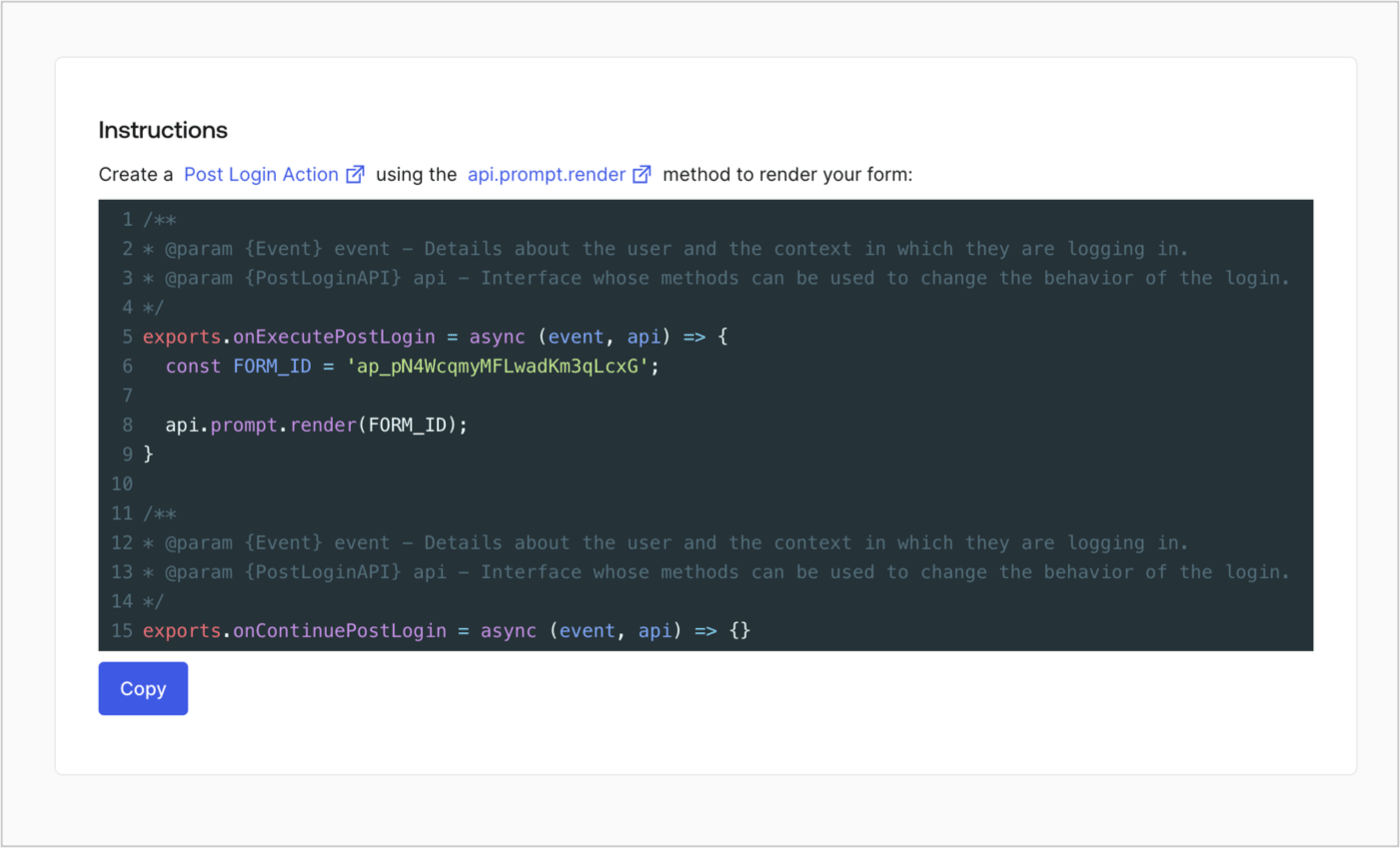
Retrieve your form render code to visually render the form with a custom Post Login Action by following these steps:

* From the Form editor, select **`<> Render`**.
* Select **Copy**.
<Frame>
  <img src="https://mintcdn.com/docs-dev-feat-docs-5607-tenant-acl/1pCYlYPjgJb3zpL-/docs/images/cdy7uua7fh8z/2EIUzc539sq9lwoTKbjoJv/496a864c0fc44a782c9cadca119dbfb0/embed.png?fit=max&auto=format&n=1pCYlYPjgJb3zpL-&q=85&s=cebebfc97d589f1ceb448ab44aa31b7d" alt="Dashboard > Actions > Forms > Form > Embed" data-og-width="1400" width="1400" data-og-height="848" height="848" data-path="docs/images/cdy7uua7fh8z/2EIUzc539sq9lwoTKbjoJv/496a864c0fc44a782c9cadca119dbfb0/embed.png" data-optimize="true" data-opv="3" srcset="https://mintcdn.com/docs-dev-feat-docs-5607-tenant-acl/1pCYlYPjgJb3zpL-/docs/images/cdy7uua7fh8z/2EIUzc539sq9lwoTKbjoJv/496a864c0fc44a782c9cadca119dbfb0/embed.png?w=280&fit=max&auto=format&n=1pCYlYPjgJb3zpL-&q=85&s=fa4e0621da972bf48499fcdbc505d38d 280w, https://mintcdn.com/docs-dev-feat-docs-5607-tenant-acl/1pCYlYPjgJb3zpL-/docs/images/cdy7uua7fh8z/2EIUzc539sq9lwoTKbjoJv/496a864c0fc44a782c9cadca119dbfb0/embed.png?w=560&fit=max&auto=format&n=1pCYlYPjgJb3zpL-&q=85&s=e6feb158f6b0ce55352d987252c0416a 560w, https://mintcdn.com/docs-dev-feat-docs-5607-tenant-acl/1pCYlYPjgJb3zpL-/docs/images/cdy7uua7fh8z/2EIUzc539sq9lwoTKbjoJv/496a864c0fc44a782c9cadca119dbfb0/embed.png?w=840&fit=max&auto=format&n=1pCYlYPjgJb3zpL-&q=85&s=01ce5e943e1a59c7edc8f36e0901a96d 840w, https://mintcdn.com/docs-dev-feat-docs-5607-tenant-acl/1pCYlYPjgJb3zpL-/docs/images/cdy7uua7fh8z/2EIUzc539sq9lwoTKbjoJv/496a864c0fc44a782c9cadca119dbfb0/embed.png?w=1100&fit=max&auto=format&n=1pCYlYPjgJb3zpL-&q=85&s=249a25a1752ec41b5c756576bac2d2a4 1100w, https://mintcdn.com/docs-dev-feat-docs-5607-tenant-acl/1pCYlYPjgJb3zpL-/docs/images/cdy7uua7fh8z/2EIUzc539sq9lwoTKbjoJv/496a864c0fc44a782c9cadca119dbfb0/embed.png?w=1650&fit=max&auto=format&n=1pCYlYPjgJb3zpL-&q=85&s=d1ffde72dcd5597c0fa12a5800646a43 1650w, https://mintcdn.com/docs-dev-feat-docs-5607-tenant-acl/1pCYlYPjgJb3zpL-/docs/images/cdy7uua7fh8z/2EIUzc539sq9lwoTKbjoJv/496a864c0fc44a782c9cadca119dbfb0/embed.png?w=2500&fit=max&auto=format&n=1pCYlYPjgJb3zpL-&q=85&s=ac9b876efac39af919c52b9dfe1617d2 2500w" />
</Frame>

## Create a Post Login Action

Create a post-login Action to render your form by following these steps:

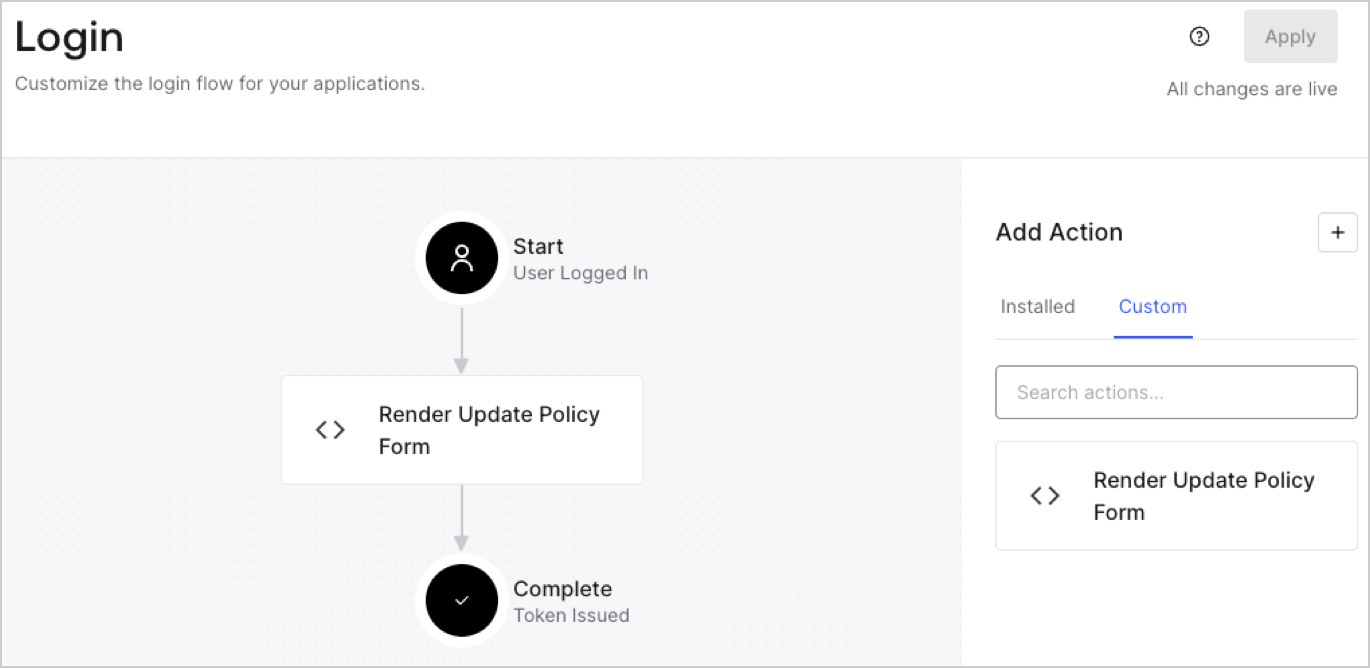
1. Navigate to **Auth0 Dashboard > Actions > Flows > Login.**
2. Select the **+** icon and Select **Build from scratch**:

   * **Name**: Enter `Render Update Policy Form`.
   * **Trigger**: Select `Login / Post Login`.
   * **Runtime**: Select the recommended version.
3. Select **Create**.

To configure the post-login Action:

1. Delete the existing code from the Code editor.
2. Paste the form render code into the Code editor.
3. Edit the code to define the conditional logic that will render the form.

   ```javascript lines theme={null}
   /**
   * @param {Event} event - Details about the user and the context in which they are logging in.
   * @param {PostLoginAPI} api - Interface whose methods can be used to change the behavior of the login.
   */
   exports.onExecutePostLogin = async (event, api) => {
     const FORM_ID = 'REPLACE_WITH_YOUR_FORM_ID';

     if (event.user.app_metadata.privacy_policies !== true) {
       api.prompt.render(FORM_ID);
     }
   }

   exports.onContinuePostLogin = async (event, api) => { }
   ```

   <Callout icon="file-lines" color="#0EA5E9" iconType="regular">
     The example code above will render the form when a user is missing the app metadata `privacy_policies` property.
   </Callout>
4. Select **Deploy.**
5. Drag and Drop the **Render Update Policy Form** Action to the **Login** flow.
   <Frame>
     <img src="https://mintcdn.com/docs-dev-feat-docs-5607-tenant-acl/pRWR7M4A70t3zO2T/docs/images/cdy7uua7fh8z/5TOwDgevZsBqd7yZynUYWU/41ca909dc3007aed4f40ff794a05efa5/postlogin.png?fit=max&auto=format&n=pRWR7M4A70t3zO2T&q=85&s=463f8b4065c3e6845a62b628749d2d12" alt="Dashboard > Forms > Use Case > Render update policy form login action" data-og-width="1370" width="1370" data-og-height="668" height="668" data-path="docs/images/cdy7uua7fh8z/5TOwDgevZsBqd7yZynUYWU/41ca909dc3007aed4f40ff794a05efa5/postlogin.png" data-optimize="true" data-opv="3" srcset="https://mintcdn.com/docs-dev-feat-docs-5607-tenant-acl/pRWR7M4A70t3zO2T/docs/images/cdy7uua7fh8z/5TOwDgevZsBqd7yZynUYWU/41ca909dc3007aed4f40ff794a05efa5/postlogin.png?w=280&fit=max&auto=format&n=pRWR7M4A70t3zO2T&q=85&s=7b162f62a48fb61ba036314f21892d6c 280w, https://mintcdn.com/docs-dev-feat-docs-5607-tenant-acl/pRWR7M4A70t3zO2T/docs/images/cdy7uua7fh8z/5TOwDgevZsBqd7yZynUYWU/41ca909dc3007aed4f40ff794a05efa5/postlogin.png?w=560&fit=max&auto=format&n=pRWR7M4A70t3zO2T&q=85&s=a41826d9982c77561c30aa4c100bb9ee 560w, https://mintcdn.com/docs-dev-feat-docs-5607-tenant-acl/pRWR7M4A70t3zO2T/docs/images/cdy7uua7fh8z/5TOwDgevZsBqd7yZynUYWU/41ca909dc3007aed4f40ff794a05efa5/postlogin.png?w=840&fit=max&auto=format&n=pRWR7M4A70t3zO2T&q=85&s=cb5e278ad39ec46aadd338b32a2b3ee8 840w, https://mintcdn.com/docs-dev-feat-docs-5607-tenant-acl/pRWR7M4A70t3zO2T/docs/images/cdy7uua7fh8z/5TOwDgevZsBqd7yZynUYWU/41ca909dc3007aed4f40ff794a05efa5/postlogin.png?w=1100&fit=max&auto=format&n=pRWR7M4A70t3zO2T&q=85&s=6a3a8b826493a90ceb2e9c129223adf1 1100w, https://mintcdn.com/docs-dev-feat-docs-5607-tenant-acl/pRWR7M4A70t3zO2T/docs/images/cdy7uua7fh8z/5TOwDgevZsBqd7yZynUYWU/41ca909dc3007aed4f40ff794a05efa5/postlogin.png?w=1650&fit=max&auto=format&n=pRWR7M4A70t3zO2T&q=85&s=5ee5ad009fc9cc19b634771acb39bf66 1650w, https://mintcdn.com/docs-dev-feat-docs-5607-tenant-acl/pRWR7M4A70t3zO2T/docs/images/cdy7uua7fh8z/5TOwDgevZsBqd7yZynUYWU/41ca909dc3007aed4f40ff794a05efa5/postlogin.png?w=2500&fit=max&auto=format&n=pRWR7M4A70t3zO2T&q=85&s=fa309bb5a2b9e89a39ad7654783e7103 2500w" />
   </Frame>
6. Select **Apply.**

### Test implementation

Test the implementation by following these steps:

1. Log in with an existing user whose app`_metadata` attribute `privacy_policies` does not have a value.
2. The post-login Action in the Login flow will render the form and prompt for acceptance.
3. Select **Auth0 Dashboard > User Management > Users,** locate the user and verify that the `app_metadata` attribute `privacy_policies` contains a `true` value and a timestamp.
